Table of Contents
Modern automotive convenience features have transformed vehicle ownership, with keyless entry and push-button start systems eliminating the fumbling with traditional metal keys that characterized driving for over a century. The Toyota RAV4 exemplifies this technological evolution, with sophisticated key fobs enabling drivers to unlock doors from across parking lots, start engines without inserting keys, and even remotely start vehicles for pre-conditioning before entering. However, this convenience depends entirely on a small coin-cell battery powering the key fob's electronic systems—and when that battery begins failing, the seamless experience degrades into frustration as the vehicle increasingly refuses to respond to commands.
The "key battery low" warning that eventually appears on RAV4 dashboards creates anxiety for many owners unfamiliar with key fob maintenance, raising questions about whether they'll be stranded, how urgently replacement is needed, what replacement costs, and whether dealership service is required for something as seemingly simple as a battery change. The reality is that key fob battery replacement ranks among the easiest automotive maintenance tasks—simpler than changing wiper blades and far less complex than air filter replacement—yet many owners remain unaware of how straightforward the process is, often paying dealerships $20-$40 for a service they could complete themselves in under five minutes with a $3-$5 battery.
Understanding when key fob batteries need replacement, recognizing the warning signs before complete failure leaves you locked out, knowing exactly how to replace batteries across different RAV4 key fob types, and implementing preventive practices that maximize battery life while avoiding premature replacement empowers owners to maintain this critical vehicle system with minimal cost and effort. The alternative—ignoring declining key fob performance until complete failure occurs at maximally inconvenient moments like arriving at airport parking with luggage, returning to your vehicle in severe weather, or attempting to leave work during an emergency—creates unnecessary stress and potential safety concerns that proactive battery maintenance easily prevents.
This comprehensive guide addresses every aspect of RAV4 key fob battery management including detailed recognition of all symptoms indicating declining battery performance from earliest warnings through complete failure, step-by-step replacement instructions with photographs and model-specific variations for different RAV4 generations, troubleshooting when battery replacement doesn't resolve issues suggesting other problems, cost analysis comparing DIY replacement versus dealer service versus emergency locksmith assistance, and preventive maintenance strategies extending battery life while avoiding practices that accelerate depletion. Whether your dashboard currently displays a low battery warning demanding immediate attention, you're experiencing intermittent key fob reliability suggesting battery decline, or you simply want to understand this maintenance requirement for planning purposes, this guide provides complete knowledge for confident key fob battery management.
Beyond the mechanical replacement process, this guide also covers practical emergency procedures for when key fob batteries die completely leaving you unable to access or start your RAV4, explains how RAV4's backup systems enable vehicle operation even with dead key fob batteries, and discusses modern key fob security features that battery warnings sometimes indicate are failing beyond simple power issues.
Understanding RAV4 Key Fob Systems and Battery Function
Before addressing battery replacement, understanding how RAV4 key fobs function, what the battery powers, and why batteries eventually fail provides essential context for recognizing symptoms and appreciating the importance of timely maintenance.
How Toyota RAV4 Key Fobs Work
RAV4 key fobs operate as sophisticated radio transmitters communicating with the vehicle through radio frequency (RF) signals typically operating at 315 MHz in North America or 433 MHz in other markets. When you press the lock button, the key fob generates and transmits a coded RF signal that the vehicle's receiver recognizes as authentic, commanding the body control module to lock doors and arm the security system. This wireless communication eliminates the need for physical key insertion while providing security through encrypted rolling codes that change with each transmission preventing signal replication by potential thieves.
Push-button start RAV4s use proximity detection where the vehicle continuously or periodically transmits low-power signals, with the key fob responding when within range (typically 3-5 feet). This proximity authentication allows the vehicle to unlock automatically when you approach with the key fob in your pocket or purse, and enables push-button starting when the authenticated fob is inside the cabin. This constant or periodic communication places continuous drain on the key fob battery unlike older systems that only activated when buttons were pressed.
The key fob battery powers multiple systems including the main microcontroller managing communication and button inputs, the RF transmitter broadcasting signals to the vehicle, the receiver detecting proximity signals from the vehicle, LED indicators providing visual feedback when buttons are pressed, and in some models, additional features like remote start capability or panic alarms. This multi-system power demand explains why key fob batteries despite being relatively large coin cells (typically CR2032 with 220mAh capacity) only last 2-4 years under typical usage.
Modern RAV4 key fobs incorporate sophisticated security features including rolling code encryption where each transmission uses unique codes preventing replay attacks, mutual authentication where vehicle and fob verify each other's legitimacy, and low-frequency (LF) wake-up systems for proximity detection that activate high-frequency (HF) communication. These security measures prevent unauthorized vehicle access but require additional computational power and communication overhead increasing battery consumption compared to simpler earlier systems.
Why Key Fob Batteries Eventually Fail
All batteries experience capacity degradation over time through chemical processes that occur regardless of usage patterns. Coin cell batteries like the CR2032 use lithium chemistry providing excellent energy density and shelf life, but even unused batteries lose approximately 1-2% capacity annually through self-discharge and internal chemical changes. Active usage accelerates depletion—each button press, proximity detection event, or communication with the vehicle draws power reducing remaining capacity.
Typical RAV4 key fob battery life ranges from 2-5 years depending on usage frequency, environmental conditions, and specific key fob model. Owners who frequently use remote functions (locking/unlocking multiple times daily, using remote start regularly, or carrying key fobs that continuously respond to vehicle proximity polling) deplete batteries faster than those with minimal usage. Similarly, extreme temperature exposure accelerates battery degradation, with both heat (above 100°F sustained) and severe cold (below 0°F) reducing battery capacity and lifespan.
Usage patterns significantly influence battery longevity, with certain behaviors causing faster depletion. Carrying key fobs in pockets or purses where buttons might be accidentally pressed causes unnecessary transmissions draining power. Leaving key fobs very close to the vehicle (within proximity detection range) when parked causes continuous or frequent communication cycles between fob and vehicle consuming more power than when the fob is stored beyond detection range. Some owners report battery life differences of 50-100% based purely on whether fobs are stored near vehicles versus in distant locations.
Manufacturing quality variation means some batteries last substantially longer than others even under identical conditions. Premium battery brands from manufacturers like Panasonic, Energizer, or Duracell typically provide longer service than generic or off-brand alternatives, with the price difference ($2 for generic versus $5 for premium) often proving worthwhile through extended replacement intervals. The few dollars saved purchasing cheap batteries costs more through doubled replacement frequency and increased likelihood of inconvenient failures.
Battery Warning System Operation
RAV4s monitor key fob battery voltage detecting when power drops below thresholds indicating impending failure, with the vehicle displaying "Key Battery Low" warnings on the dashboard when battery voltage reaches approximately 2.3-2.5 volts (versus the 3.0-volt nominal voltage of fresh CR2032 batteries). This monitoring system provides advance warning allowing proactive replacement before complete failure, though the warning timing varies based on usage patterns—heavy users might see warnings just weeks before failure while light users might operate months after initial warnings before batteries die completely.
The warning appears after the vehicle successfully communicates with the key fob, meaning the fob still functions when warnings first display but has limited remaining life. Many owners mistakenly believe warnings indicate immediate failure risk requiring emergency dealer visits, when in reality warnings typically provide 2-6 week grace periods for convenient replacement under normal usage patterns. However, delaying replacement indefinitely eventually results in complete failure potentially occurring at maximally inconvenient moments.
Once warned, owners should plan replacement within 1-2 weeks allowing time to purchase replacement batteries, perform replacement at convenient times, and test new battery function before discarding old batteries. This proactive timeline prevents being forced into reactive emergency service when batteries fail completely, potentially during adverse weather, late at night, or in unfamiliar locations where help is difficult to access.
Some RAV4s provide multiple warning escalations starting with occasional warnings when battery voltage first declines, progressing to persistent warnings with every startup as voltage drops further, and finally displaying critical warnings suggesting immediate replacement when voltage approaches failure levels. Understanding this escalation pattern helps owners recognize urgency—early occasional warnings allow leisurely replacement planning while persistent or critical warnings demand immediate action within days.
Recognizing Key Battery Low Symptoms: Progressive Failure Patterns
Key fob battery failure rarely occurs suddenly without warning, instead progressing through predictable symptom stages that alert owners to declining performance requiring attention.
Early Warning Signs: Reduced Range and Responsiveness
The first indication of declining battery power typically involves reduced operating range, with key fob functions that previously worked from 50-75 feet away now requiring 20-30 feet for reliable operation. This range reduction reflects weakening RF transmitter power as battery voltage declines—the transmitter can no longer generate signals strong enough to reliably reach the vehicle's receiver from previous maximum distances. Owners might notice needing to be closer to vehicles before remote unlock responds, or finding remote start occasionally fails requiring multiple attempts or closer proximity.
Button press responsiveness becomes inconsistent, with key fobs sometimes requiring multiple button presses before the vehicle responds. Fresh batteries generate immediate reliable response with single button presses, while declining batteries cause intermittent communication failures requiring 2-3 presses before successful vehicle response. This symptom particularly manifests in challenging RF environments like parking structures or areas with electronic interference where weaker signals face more difficulty reaching receivers.
The key fob LED (if equipped) might illuminate more dimly than when new, or fail to illuminate at all despite button presses registering eventually. The LED indicator provides immediate visual feedback that buttons were pressed, drawing modest power from the battery. As voltage declines, LED brightness diminishes or the LED stops functioning entirely while basic RF transmission continues—using LED operation as a crude battery test provides rough indication of remaining capacity.
Cold weather exacerbates early symptoms as batteries provide less power at low temperatures. A key fob operating normally in warm weather might show significant range reduction or responsiveness issues when temperatures drop below 20°F, with function improving as batteries warm in pockets or inside vehicles. This temperature sensitivity intensifies as batteries age, with newer batteries showing minimal cold weather degradation while nearly-depleted batteries might barely function in extreme cold.
Intermediate Symptoms: Dashboard Warnings and Increased Failures
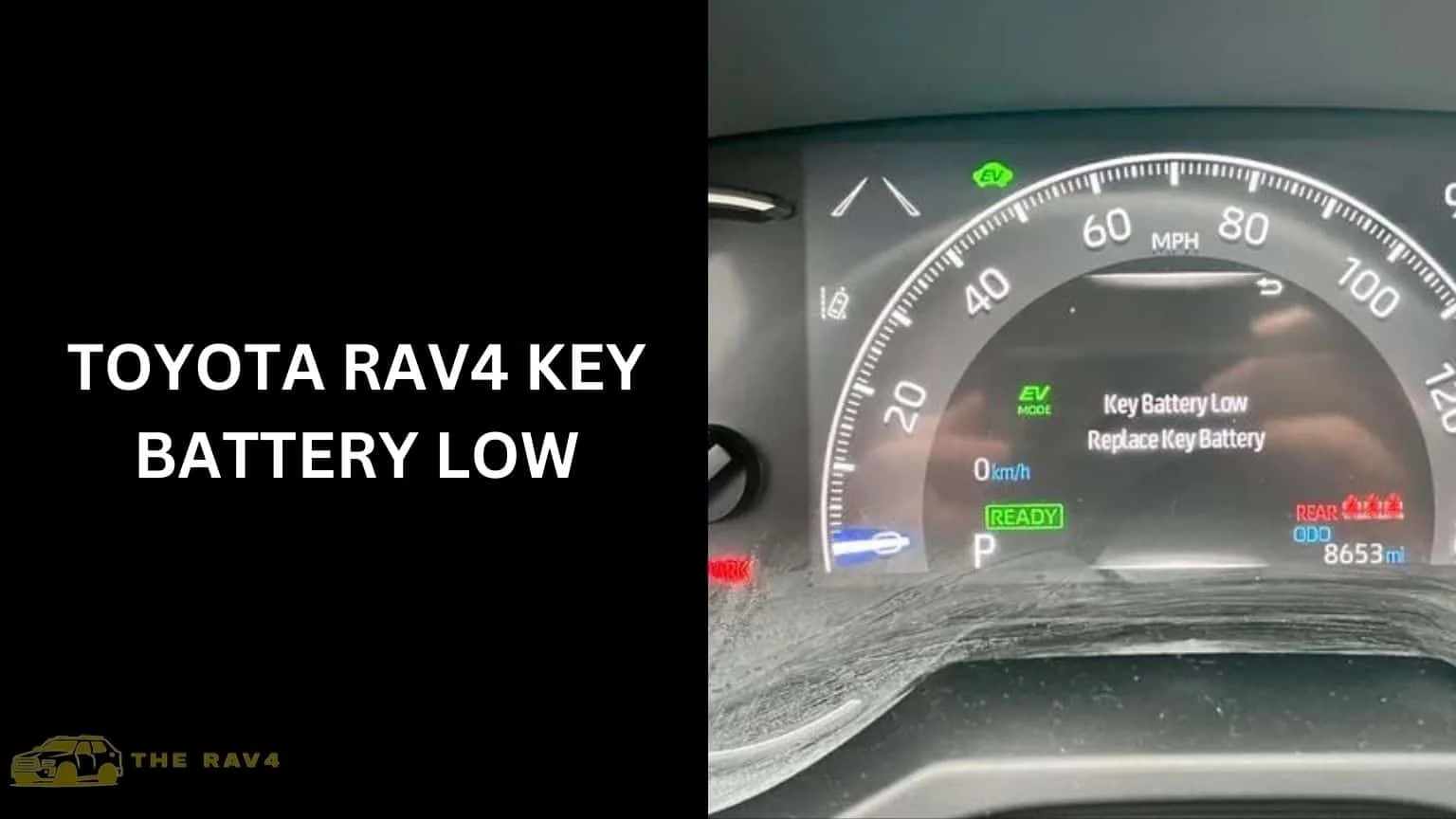
The "Key Battery Low" warning appearing on the dashboard represents the most obvious intermediate symptom, displayed after engine startup or during driving when the vehicle's system detects battery voltage below threshold levels. This warning varies by model year and trim level—some RAV4s display simple text messages while others show graphical key fob icons with battery indicators, with messages ranging from informational "Key Battery Low" to more urgent "Replace Key Battery Soon."
Keyless entry functionality becomes unreliable, with approaches to the vehicle that should automatically unlock doors instead requiring button presses or failing entirely. Proximity-based automatic unlocking places continuous communication demand on key fobs consuming more power than simple remote button presses—as batteries decline, the proximity detection system typically fails before basic remote lock/unlock buttons stop working. This creates the pattern where key fobs still respond to button presses but no longer automatically unlock when approached.
Push-button start occasionally refuses to recognize the key fob even when inside the cabin, displaying "Key Not Detected" messages and preventing engine starting. Similar to proximity unlocking, push-button start requires the key fob to power its receiver and respond to vehicle polling—declining batteries sometimes lack sufficient power for this continuous communication even when button press functions still work. Owners might need to hold key fobs directly against push-button start buttons (where backup NFC readers can detect the physical key fob even with completely dead batteries) to start vehicles.
Remote start functionality fails completely if equipped, as this feature requires strongest signal communication transmitting commands over extended distances potentially hundreds of feet. Remote start typically fails before basic lock/unlock functions, providing an early warning that battery replacement will soon be needed even if proximity features and button presses continue working temporarily.
Critical Symptoms: Imminent or Complete Failure
Complete failure to unlock or lock the vehicle remotely indicates critically depleted batteries barely maintaining minimal function or having failed entirely. When key fob button presses produce no vehicle response even from close proximity (5-10 feet), the battery has likely depleted below minimum operating voltage requiring immediate replacement. However, before assuming complete battery failure, verify the issue isn't vehicle-side by testing with spare key fobs if available or checking vehicle battery condition affecting receiver power.
No LED illumination despite button presses combined with complete loss of vehicle response indicates definitive battery failure, with insufficient power to run any key fob functions. This total failure typically requires using backup mechanical key access (discussed later) until batteries can be replaced, though owners experiencing this should also verify that button mechanisms haven't failed independently of battery issues—if brand new batteries don't restore function, button or circuit board problems might exist requiring key fob replacement.
Intermittent function where key fobs work occasionally but unpredictably characterizes the final stages before total failure, with batteries providing just enough power for sporadic operation depending on temperature, how recently the fob was used, and random factors. This unpredictability proves particularly frustrating as fobs sometimes work creating false confidence they're still reliable, followed by complete failure at inopportune moments. Once intermittent behavior emerges, replacing batteries immediately should be priority regardless of other factors.
Dashboard warnings become persistent or critical displaying every time the vehicle starts and potentially remaining visible during driving rather than disappearing after initial acknowledgment. Some RAV4s escalate warning urgency displaying red warning lights or alert icons rather than simple informational messages when battery voltage drops to critical levels. These persistent urgent warnings demand immediate replacement as complete failure likely occurs within days or even hours.
Step-by-Step RAV4 Key Fob Battery Replacement Guide
Replacing RAV4 key fob batteries requires no special tools, costs under $5 for batteries, and takes less than 5 minutes even for first-time attempts—making this among the simplest vehicle maintenance tasks owners can perform themselves.
Identifying Your Key Fob Type and Required Battery
RAV4 key fobs have evolved through generations with different designs requiring slightly different replacement procedures. The most common types include traditional key fob with separate mechanical key blade integrated into the fob body, smart key fobs with concealed mechanical backup keys released via slide button, and older separate key and remote designs less common in recent models. Identifying your specific type ensures following correct procedures and purchasing proper replacement batteries.
Nearly all modern RAV4 key fobs use CR2032 batteries—standardized 20mm diameter, 3.2mm thick lithium coin cells widely available at pharmacies, grocery stores, automotive retailers, and online. Some older models used CR2016 (thinner 1.6mm) or CR2025 (medium 2.5mm) batteries, though these are increasingly rare. Checking the battery marking when opening the fob confirms which type you need, or consult your owner's manual which specifies correct battery type.
Purchase quality batteries from reputable brands rather than cheapest available options, as premium batteries from Panasonic, Energizer, Duracell, or Sony typically provide 50-100% longer service life than generic brands despite costing just $2-$3 more. The total battery cost even for premium options runs $4-$6 compared to $20-$40 for dealer replacement, making even premium DIY replacement extremely economical. Buying multipacks provides spare batteries for future replacement and potentially for other devices using CR2032 cells.
Verify battery expiration dates when purchasing as even unused batteries degrade over time through self-discharge and chemical aging. Batteries manufactured within the past year provide optimal performance, while those sitting on shelves for 3-4+ years might already have reduced capacity shortening their service life in your key fob. Most batteries print manufacture dates or expiration dates (typically 10 years from manufacture) on packaging—choose freshest stock available.
Tools and Materials Needed
Minimal tools are required for RAV4 key fob battery replacement:
- New CR2032 battery (or model-specific alternative)
- Small flathead screwdriver, butter knife, or coin for prying open key fob
- Clean cloth or tissue for handling components
- Optional: Tweezers for removing old batteries if fingers prove difficult
Most replacements require only the new battery and a small flathead screwdriver, with many owners successfully using coins (quarters work well) or butter knives as substitutes for dedicated screwdrivers. The key fob case design includes small notches or slots allowing insertion of thin flat tools for gentle prying—excessive force isn't needed and should be avoided to prevent case damage or breaking the internal clips holding halves together.
Prepare a clean, well-lit workspace preventing lost screws or components, with adequate lighting helping you see small battery orientation markings and properly align case halves during reassembly. Working over a towel or soft surface prevents dropped batteries or fobs from bouncing and potentially rolling into inaccessible areas, while also protecting key fob surfaces from scratching on hard surfaces.
Detailed Replacement Procedure
Step 1: Release the mechanical backup key if your key fob type has one integrated. Most smart key fobs include a small slide button or switch on the side or back that releases a concealed mechanical key blade. Press or slide this release mechanism and pull out the mechanical key, setting it aside safely. This step isn't strictly necessary for battery replacement but provides easier access to case prying points and prevents accidentally damaging the mechanical key during the opening process.
Step 2: Locate the case separation point where you'll insert your prying tool. Most RAV4 key fobs have a visible slot or notch along the side edge designed specifically for case opening, often near where the mechanical key was stored. This slot accommodates the tip of a small screwdriver or coin, providing leverage point for separating case halves. Some older fobs might require prying at multiple points or have small screws requiring removal before case opens.
Step 3: Gently pry open the key fob case by inserting your flathead screwdriver or coin into the designated slot and applying gentle twisting pressure to separate the case halves. The case should pop apart relatively easily with moderate force—if it feels like excessive force is required, verify you're using the correct separation point and that any screws have been removed. Avoid damaging the plastic case edges or breaking internal clips by applying slow, steady pressure rather than sudden jerks or heavy force.
Step 4: Identify the battery location and orientation once the case opens. The battery typically sits in a small compartment or holder with the positive (+) side facing either up or down depending on fob design. Most batteries are marked with "+" on one side indicating positive orientation—note which direction the old battery faces before removal to ensure correct installation of the new battery. Some fobs include orientation markings (+ or -) on the circuit board or battery holder indicating correct placement.
Step 5: Remove the old battery by gently prying it from its holder using fingernails, a small screwdriver, or tweezers. Some batteries sit in spring-loaded holders requiring you to press them to one side before they release, while others simply lift out of holders. Avoid touching the exposed circuit board with tools or dirty fingers as oils and contaminants can damage electronics—handle only the battery and plastic case components during this process.
Step 6: Insert the new battery in the same orientation as the old battery, ensuring the positive (+) side faces the correct direction. The battery should sit flat and flush in its holder without protruding or sitting at angles. If the battery doesn't sit properly, verify you have the correct battery type (CR2032 versus CR2016/CR2025) and that it's oriented correctly—improper orientation will prevent the battery from functioning and might damage the fob.
Step 7: Reassemble the key fob case by aligning the two halves and pressing firmly until all clips snap securely into place. The case should close completely with no visible gaps between halves and all edges flush. If the case won't close easily, verify no wires or components are pinched between halves and that the battery sits properly in its holder rather than protruding and interfering with closure.
Step 8: Test the key fob operation by pressing buttons and verifying LED illumination (if equipped) and vehicle response. Stand near your vehicle and test lock/unlock functions confirming successful battery replacement and proper function. If the key fob doesn't work after battery replacement, verify battery orientation, ensure the battery makes solid contact with holder terminals, and confirm case closure didn't disconnect any internal components.
Step 9: Reinsert the mechanical backup key if it was removed during replacement, ensuring it fully engages and locks into place. Test that the key can be released again using the release mechanism confirming proper installation.
Model-Specific Variations
2006-2012 third-generation RAV4s typically use older key fob designs with more obvious case screws or prying points, often requiring small Phillips-head screwdrivers to remove case screws before accessing batteries. These older designs are generally more straightforward but require careful screw management preventing loss of tiny screws that might be difficult to replace.
2013-2018 fourth-generation RAV4s introduced smart key systems with concealed mechanical keys and slimmer profiles, using the mechanical key slot as the primary prying point for case opening. These fobs typically don't use screws, instead relying on internal clips holding case halves together—gentle but firm prying pressure is required to pop cases apart without breaking clips.
2019-2024 fifth-generation RAV4s continue smart key designs with minor cosmetic variations but functionally similar battery replacement procedures. Some newer models use slightly different internal layouts but maintain CR2032 batteries and similar access procedures through mechanical key removal and case prying.
Hybrid and Prime models use identical key fob designs as gas models from the same generation, requiring no special procedures or different batteries despite the vehicles' different powertrains. All RAV4 variants within a given generation typically share common key fob designs simplifying replacement procedures across the model range.
Emergency Procedures: Operating Your RAV4 With Dead Key Fob Battery
Despite best intentions, key fob batteries sometimes die completely before replacement, creating situations where owners must access and operate vehicles using backup systems Toyota provides for exactly this scenario.
Accessing the Vehicle With Mechanical Backup Key
All RAV4 key fobs include concealed mechanical backup keys specifically for situations where electronic systems fail, batteries die, or key fobs are damaged. To access this backup key, locate the small release button or slide switch on the key fob body (typically on the side or back), press or slide this mechanism, and pull out the retractable key blade. This physical key provides traditional mechanical access when electronics fail.
The driver's door includes a hidden mechanical keyhole beneath a small trim cover on the door handle. To access this keyhole, locate the small trim cap (often on the door handle edge nearest the front of the vehicle), gently pry it off using fingernails or the mechanical key blade itself, revealing the keyhole beneath. Insert the mechanical key and turn to unlock the door, providing vehicle access even with completely dead key fob battery.
Opening the door with mechanical key typically triggers security system alarms in RAV4s with anti-theft systems, as the vehicle doesn't receive the normal electronic authentication from the key fob during door opening. This alarm will sound when you open the door and continue until you disarm it by inserting the key fob into the ignition (older models) or holding it against the push-button start (newer models) and pressing the button.
Practice locating and accessing the mechanical key before emergencies occur, ensuring you can operate this backup system when actually needed rather than fumbling in rain, darkness, or stressful situations where time pressure makes simple tasks more difficult. Many owners have never removed their mechanical keys and don't realize this backup system exists until key fob failures leave them locked out—a five-minute familiarization session prevents this frustration.
Starting the Engine With Dead Key Fob Battery
Older RAV4s with traditional ignition key slots can be started normally using the mechanical backup key, as these models don't depend on electronic key fob authentication for starting. Simply insert the mechanical key into the ignition and turn to start the engine as you would with traditional keys—the separate key fob functions only for remote entry while engine starting relies on mechanical key recognition.
Newer RAV4s with push-button start include backup starting procedures specifically for dead key fob situations, though these vary by model year. Most commonly, holding the key fob directly against the push-button start button enables starting through near-field communication (NFC) that doesn't require battery power—the vehicle detects the physical key fob's cryptographic chip through this close proximity connection and authorizes starting. Try pressing the brake pedal and holding the key fob flat against the start button, then pressing the button to start the engine.
Some RAV4 models require placing the key fob in specific locations like cup holders or wireless charging pads where backup readers are integrated. Consult your owner's manual for model-specific procedures, as backup starting methods vary across model years and trim levels. The manual typically includes sections titled "What to do if..." or "Emergency procedures" detailing exact steps for your specific vehicle.
Once the engine starts using backup procedures, the vehicle operates normally with all systems functioning despite dead key fob battery. You can drive home or to a store to purchase replacement batteries, start and stop the engine using backup procedures as needed, though you'll need to repeat the backup starting process each time you restart after shutting off. Some RAV4s limit certain functions like remote start or convenience features when operating in backup mode, but basic driving capabilities remain unaffected.
Plan to replace key fob batteries promptly after needing emergency procedures, as continuing to operate in backup mode proves inconvenient and doesn't address the underlying battery depletion issue. Additionally, some backup systems might have usage limitations or degrade authentication security, making prompt battery replacement preferable to extended backup mode operation.
Troubleshooting: When Battery Replacement Doesn't Fix Issues
Occasionally, key fob problems persist even after battery replacement, indicating issues beyond simple battery depletion that require different diagnostic approaches and solutions.
Verifying Proper Battery Installation
If the key fob doesn't function after battery replacement, first verify correct battery orientation, as reversed batteries won't work and might damage the key fob. Remove the battery and check that the positive (+) side faces the correct direction according to markings on the fob or notes you made during removal of the old battery. Reinstall ensuring proper orientation and test again before concluding other problems exist.
Ensure the battery makes solid electrical contact with the terminal clips inside the fob, as weak or poor contact prevents proper function despite correct battery installation. The battery should sit flat and firmly in its holder with no wobbling or loose fit. Some fobs use spring-loaded contacts requiring adequate pressure to establish connection—verify the battery seats fully rather than sitting proud of its holder preventing proper case closure and contact pressure.
Confirm you installed the correct battery type rather than accidentally using a similar but incompatible size. CR2032, CR2025, and CR2016 batteries are physically very similar but have different thicknesses (3.2mm, 2.5mm, and 1.6mm respectively)—installing a thinner battery in a fob designed for thicker batteries might create inadequate contact despite correct diameter. Check the old battery marking confirming type and verify the new battery matches.
Test battery voltage using a multimeter if available, confirming the new battery actually provides proper voltage (should read 3.0-3.3 volts for fresh CR2032) rather than being a defective or previously-depleted battery. Occasionally, batteries are mislabeled, stored improperly before purchase reducing capacity, or are defective from manufacturing. Testing voltage eliminates this possibility before pursuing more complex diagnosis.
Key Fob Reprogramming After Battery Replacement
Some RAV4s lose key fob programming when batteries die or are replaced, requiring reprogramming to restore function. This particularly affects older models and fobs that were completely dead for extended periods before replacement. Programming procedures vary by model year, but generally involve inserting the key (if equipped) and cycling the ignition or performing button press sequences while inside the vehicle.
Common reprogramming procedures for Toyota key fobs include sitting in the driver's seat with all doors closed, inserting the key and turning from OFF to ON (without starting) and back to OFF repeatedly (typically 2-3 times), removing the key, and pressing lock/unlock buttons on the fob while near the vehicle. Successful programming often produces a confirmation beep or light flash from the vehicle. However, specific procedures vary by model year—consult your owner's manual or search online for model-specific reprogramming instructions.
Dealership reprogramming provides a guaranteed solution when DIY programming attempts fail, typically costing $50-$100 including diagnostic time and programming. While this seems expensive for button battery replacement, it resolves stubborn cases where key fobs refuse to communicate after battery changes despite correct installation and procedures. Some independent automotive locksmiths also offer key fob programming services potentially at lower cost than dealerships.
Multiple key fobs might require individual reprogramming if you have spare fobs that were also depleted or experienced issues. Once one fob programs successfully, test all your fobs confirming they work properly or identifying which specific fobs require reprogramming. Dealership programming sessions can typically handle multiple fobs simultaneously if needed.
Other Key Fob Problems Beyond Battery Issues
Button mechanism failure causes symptoms similar to battery depletion but persists after battery replacement, with buttons requiring excessive force, feeling mushy, or not responding despite pressing. Internal button contacts can wear out or become contaminated with dirt and oils preventing proper electrical connection when pressed. This repair typically requires key fob disassembly and cleaning or button replacement beyond most owners' DIY capabilities—dealership or locksmith service becomes necessary.
Circuit board damage from dropping or water exposure might prevent key fob function despite working batteries. Examining the circuit board inside the fob reveals physical damage like cracked circuit traces, burnt components, or corrosion from liquid damage. Water-damaged fobs sometimes can be salvaged through careful cleaning with isopropyl alcohol and thorough drying, though severely damaged circuit boards require complete key fob replacement.
Antenna or RF component failure prevents transmission of signals even when batteries power the fob's electronics. If LEDs illuminate when buttons are pressed but the vehicle never responds, the transmitter circuits might have failed preventing signal broadcast. Diagnosing this requires specialized equipment measuring RF output—professional service or replacement becomes necessary as component-level repair proves impractical for most key fobs.
Vehicle-side receiver problems rather than key fob issues sometimes cause symptoms that appear to be fob problems. If multiple key fobs all fail simultaneously or new batteries don't resolve issues across all fobs, the vehicle's receiver systems might have failed or antenna connections became disconnected. This requires professional diagnosis as vehicle-side receiver repairs involve complex body control module troubleshooting beyond typical owner capabilities.
Cost Analysis: DIY Versus Professional Replacement
Understanding the economics of key fob battery replacement helps owners make informed decisions about whether DIY service or professional assistance makes sense for their situations.
DIY Replacement Costs
Battery costs represent the only expense for DIY replacement, with CR2032 batteries priced $3-$6 each for quality brands from pharmacies, grocery stores, or automotive retailers. Multipacks offer better per-battery costs ($2-$4 each when buying 4-10 packs) while providing spares for future replacements or other devices. Even premium batteries cost less than $10 total, making DIY replacement extremely economical.
Time investment for DIY replacement runs 5-10 minutes for first attempts including carefully opening the fob, replacing the battery, and testing function, with subsequent replacements taking just 2-3 minutes once you're familiar with the procedure. This minimal time commitment combined with trivial costs makes DIY replacement compelling for most owners, with the only barrier being comfort with basic mechanical tasks and having a few minutes to complete the job.
Purchasing batteries in advance allows immediate replacement when needed without requiring special trips to stores, making the process even more convenient. Keeping spare CR2032 batteries in home toolkits or junk drawers ensures replacement batteries are available whenever dashboard warnings appear, eliminating "I'll get to it later" delays that allow complete battery failure. The $10-$15 investment for 4-5 spare batteries provides years of coverage for multiple replacements.
Dealership Service Costs
Toyota dealerships typically charge $20-$40 for key fob battery replacement, with costs varying by region and dealership pricing strategies. This fee covers battery cost (marked up substantially from retail prices), technician time, and overhead. While this seems expensive for a 2-minute job, some owners prefer professional service for convenience, peace of mind that installation is correct, or simply discomfort with DIY mechanical tasks.
Dealership service provides guaranteed proper installation with technicians trained on all key fob types across Toyota's model range and equipped to handle unusual cases or reprogramming needs that might emerge. If battery replacement doesn't resolve issues, dealerships can immediately diagnose and address more complex problems rather than owners needing to troubleshoot independently. This comprehensive service justifies the premium pricing for owners valuing convenience over cost savings.
Combined service during regular maintenance visits eliminates the extra trip, making dealership battery replacement more attractive when you're already there for oil changes or other service. Many dealerships offer complimentary battery replacement during service appointments as a customer courtesy, particularly for owners with regular service histories—asking about complementary replacement during scheduled visits costs nothing and might save the $20-$40 fee.
Extended warranty or maintenance plans sometimes cover key fob battery replacement, effectively making it free for owners with these programs. Check your specific plan coverage before paying out-of-pocket, as some comprehensive maintenance packages include key fob service while others exclude it as routine owner maintenance.
Emergency Locksmith Costs
Mobile locksmiths charge $75-$150+ for emergency key fob battery replacement, particularly when called after-hours, to remote locations, or in emergency situations where owners are locked out. These premium prices reflect the convenience of mobile service, emergency response capabilities, and the business overhead of maintaining 24/7 availability. While expensive for battery replacement, locksmith service proves valuable when complete key fob failure creates lockout situations requiring immediate resolution.
Planning ahead through DIY battery replacement eliminates the possibility of emergency locksmith expenses, as proactive replacement when dashboard warnings first appear prevents complete failure creating lockout emergencies. The $3 DIY battery replacement versus $150 emergency locksmith call represents $147 in savings—powerful motivation for keeping spare batteries available and replacing them promptly when warnings appear.
Locksmith services provide value beyond just battery replacement including key fob programming, mechanical key cutting, and complete key fob replacement if batteries don't resolve issues. For complex situations involving multiple problems, locksmith expertise might justify the premium pricing, though dealerships often provide similar comprehensive services at lower costs if time permits visiting them versus requiring emergency response.
Conclusion: Proactive Key Fob Battery Management
Toyota RAV4 key fob battery maintenance ranks among the simplest yet most important routine vehicle care tasks, requiring minimal time and cost while preventing potentially significant inconvenience from unexpected failures. Understanding that key fob batteries inevitably deplete over 2-5 year periods, recognizing the progressive symptoms indicating declining performance, knowing exactly how to replace batteries through straightforward 5-minute procedures, and implementing backup operation techniques for emergency situations empowers confident vehicle operation without anxiety about key fob failures.
The most important takeaway is proactive replacement when dashboard warnings first appear or when symptoms like reduced range or intermittent function emerge. The $3-$5 battery cost and 5-minute time investment for prompt replacement proves trivially small compared to the stress, inconvenience, and potential costs of complete failures occurring at maximally inconvenient moments like arriving at airports, during severe weather, late at night in unfamiliar areas, or when rushing to emergency situations where vehicle access delays create cascading problems.
Keeping spare CR2032 batteries readily available in home toolboxes, kitchen junk drawers, or vehicle glove boxes ensures replacement capability whenever needed without requiring special shopping trips or delaying replacement until convenient store visits can be arranged. The $10-$15 investment for a multipack of quality batteries provides several years of coverage for multiple replacements across multiple key fobs, making this preparation extremely cost-effective insurance against inconvenient situations.
Familiarizing yourself with backup access and starting procedures before emergencies occur provides peace of mind that complete key fob failure doesn't leave you stranded. Knowing where mechanical backup keys are located, how to access hidden door keyholes, and which backup starting procedures work for your specific RAV4 model transforms what might otherwise be crisis situations into minor inconveniences requiring just a few extra steps to access and operate your vehicle.
The combination of proactive battery replacement, readily-available spare batteries, and emergency procedure knowledge creates comprehensive key fob management eliminating this potential failure point from your vehicle ownership experience, allowing you to enjoy your RAV4's convenient keyless systems without the anxiety that many owners experience regarding key fob reliability.